I’ve been using the online video editor VEED.io as my main platform for editing and recording videos for over a year now – and to be honest, I’m still pleasantly surprised.
Although sometimes someone somewhere tells me about some other free platforms, I still remain a fan of this particular platform because of its ease of use and comfort.
As someone who creates content regularly, I needed a tool that would allow me to record, edit, polish, and export videos quickly — without complicated software, heavy downloads, or technical overwhelm. What I discovered is that VEED isn’t just an editor. It’s a complete browser-based video studio powered by smart automation and AI tools that genuinely save time.
If you’re a creator, marketer, educator, or business owner, here’s a deep dive into what this platform offers and why it’s become part of my workflow. I’m not trying to compare it to other platforms, simply because I’ve tried some others, but they were all a bit different, but here I tried and even without instructions everything became very simple and convenient. Maybe this is the kind of product that, after working with, you just feel like everything goes smoothly.
A True All-in-One Video Workspace
One of the biggest advantages of VEED.io is that everything works directly in your browser. There’s no need to install programs or constantly update software. You log in, and your entire video workspace is there.
Unlike traditional editing software, VEED is built for speed and accessibility. It’s designed for people who want professional results but don’t want to spend weeks learning complex interfaces.
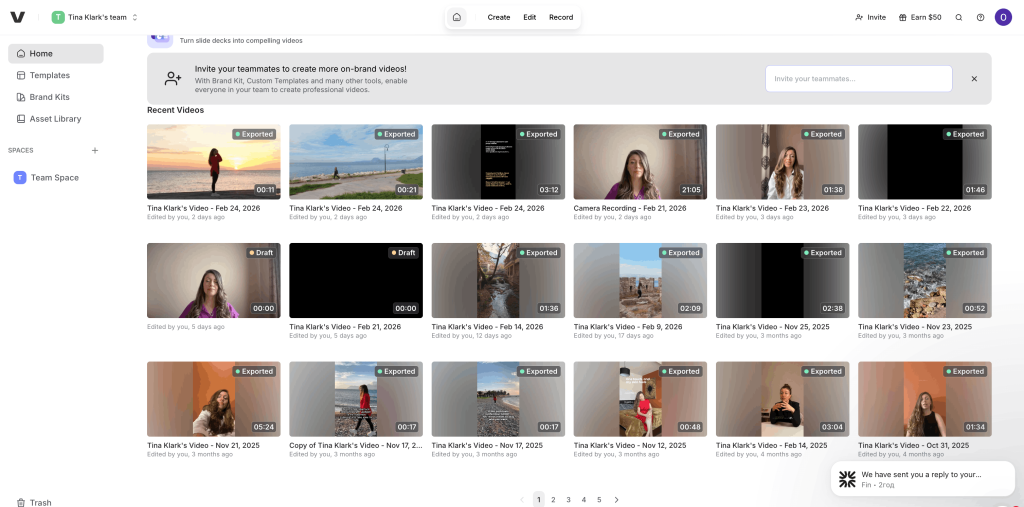
Core Editing Features (Simple but Powerful)
At its foundation, VEED offers all the essential editing tools you’d expect — but in a very intuitive format:
- Trim, cut, split, and merge clips
- Drag-and-drop timeline editing
- Add music, sound effects, and voiceovers
- Insert text overlays and animated titles
- Apply transitions and visual effects
- Crop and resize videos for different platforms
- Adjust playback speed
- Add filters and color corrections
- Compress and convert video formats
The interface feels clean and logical. Even if you’re not a professional editor, you can create polished videos without frustration.
What I particularly appreciate is how quickly you can adapt one video to multiple formats — square for Instagram, vertical for TikTok, horizontal for YouTube — all inside the same project.
Built-In Recording Tools
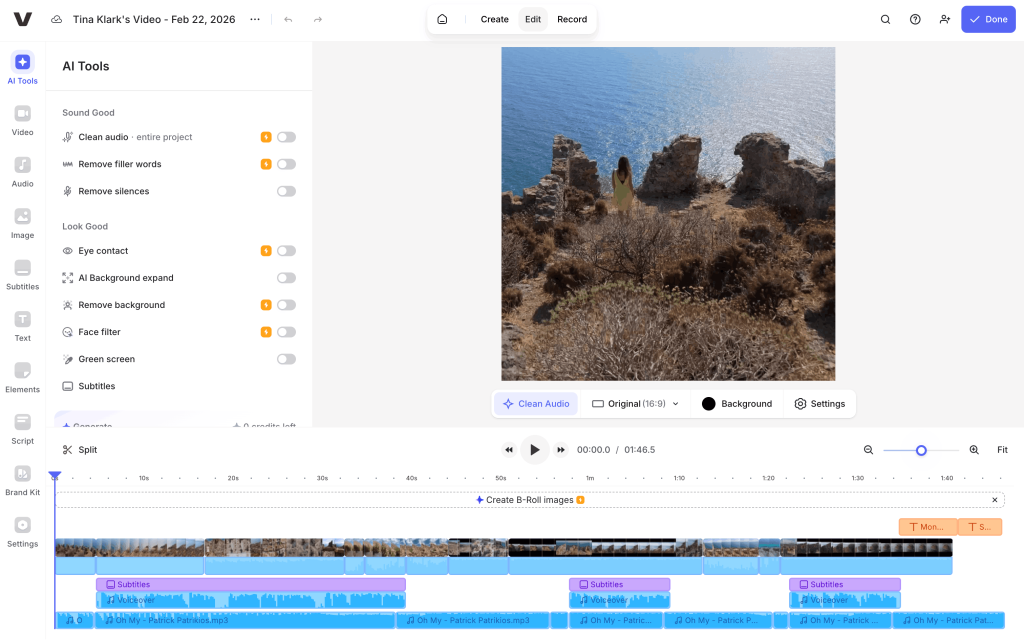
VEED is not only an editor — it’s also a recording platform. This is one of the reasons I continue subscribing.
You can:
- Record your screen
- Record your webcam
- Record both screen and webcam simultaneously
- Add voiceovers directly inside the editor
For tutorials, presentations, product demos, or educational videos, this feature is incredibly practical. There’s no need to use separate screen recording software and then upload files manually — everything happens in one place.
For me, this alone saves a huge amount of time.
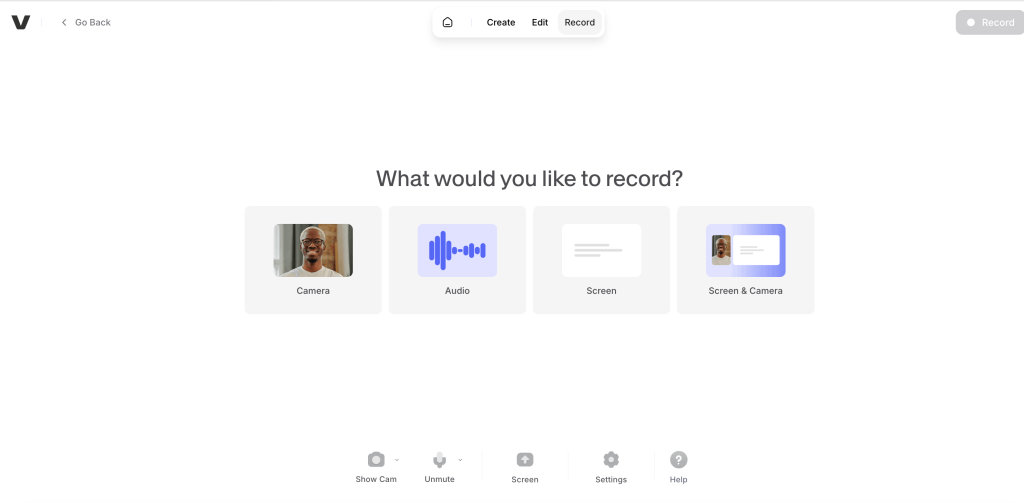
The AI Tools That Actually Make a Difference
Now let’s talk about what really makes VEED stand out — its AI features.
Unlike many platforms that add “AI” as a marketing buzzword, VEED integrates automation in ways that genuinely improve workflow.
Here are some of the most useful AI-powered options:
Auto Subtitles
Automatically generates captions with impressive accuracy. You can edit text, change fonts, colors, positioning, and animation styles. For social media content, this is essential.
AI Translation
Translate subtitles into multiple languages, which is ideal for reaching global audiences.
Text-to-Speech
Turn written scripts into voiceovers using AI voices. This is helpful when you need narration but don’t want to record manually.
Voice Cloning
Create voiceovers that replicate a specific tone or voice style.
Background Noise Removal
Clean up audio instantly — extremely helpful if you don’t have a professional studio setup.
Eye Contact Correction
A fascinating feature that adjusts your eye direction so it appears you’re looking directly at the camera. I tried it a few times, but to be honest, I didn’t really like it, because when the video is with me, I get this feeling of artificiality, it was somehow difficult to look at myself, it made me feel like I wasn’t speaking sincerely, that’s the effect of AI. That’s why I don’t use this option. But the idea is very interesting.
Automatic Silence Removal and Smart Cuts
AI detects pauses and unnecessary silence, making editing interviews and talking-head videos much faster.
AI Avatars and Talking Head Videos
Generate AI avatars or presenters for certain types of content. I haven’t tried this tool yet, but it’s available on the platform. You can create AI narrators for your videos, which can be handy for certain types of content.
These tools dramatically reduce editing time. Instead of manually cleaning audio or creating captions line by line, you can automate and then refine.
For anyone producing content consistently, this is a game changer.
Branding and Team Collaboration
VEED also works well for teams and businesses.
You can create brand kits with fonts, logos, and color palettes to keep videos consistent. There are collaboration features that allow teammates to review, comment, and work on projects together.
For marketing teams or agencies, this adds a professional layer to workflow management.
Templates and Content Creation Speed
Another underrated feature is the variety of templates.
If you’re creating social media content, promotional videos, ads, or educational reels, you can start from a template and customize it instead of building everything from scratch.
For busy content creators, this significantly speeds up production.
Exporting and Publishing
When your video is ready, exporting is simple and flexible.
You can:
- Choose different resolutions (including HD)
- Adjust compression
- Download files quickly
- Share videos via link
- Embed videos directly
Because the platform is cloud-based, your projects are saved online and accessible from anywhere.
What I Personally Value Most
After more than a year of use, what keeps me subscribed is not just the feature list — it’s the combination of simplicity ease of learning, intuitive interface and intelligence.
It feels like a tool built for modern creators:
- Fast
- Automated
- Accessible
- Practical
- Continuously improving
Instead of overwhelming users with complexity, VEED focuses on efficiency. You can create professional content without needing advanced technical skills.
Are There Any Downsides?
Like any browser-based tool, performance depends on internet speed. Large projects may take time to render.
Also, some of the most advanced AI features are available only in paid plans. However, if you create content regularly, the subscription quickly justifies itself through time saved.
Final Thoughts
VEED.io has evolved into much more than a basic online video editor. It’s a modern content creation platform that blends editing, recording, AI automation, branding, and publishing in one place.
For solo creators, marketers, educators, and businesses, it offers an efficient way to produce high-quality video content without technical complexity.
After using it for over a year, I can confidently say it’s one of the most practical and forward-thinking video tools available today — especially if speed, convenience, and smart automation matter to you


No Responses